
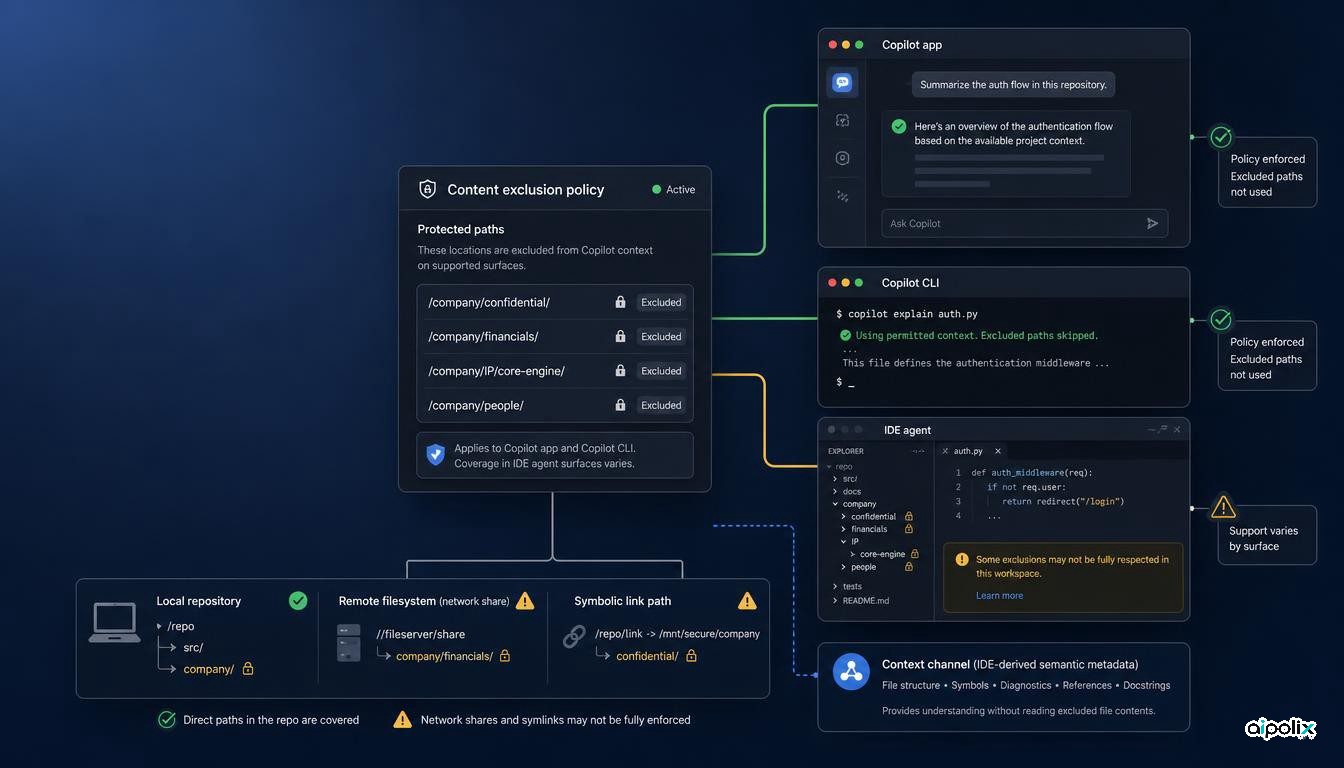
GitHub made content exclusion generally available in the GitHub Copilot app and Copilot CLI on September 2, extending an enterprise policy control into two agentic surfaces that can inspect repositories and act on developer requests. For Copilot Business and Copilot Enterprise customers, policies configured by enterprise, organization, or repository administrators are now respected by those clients, and excluded files are not used as Copilot context.
That closes an important governance gap, but it does not turn content exclusion into a universal boundary around sensitive code. GitHub's own documentation still describes different levels of support across Copilot surfaces, explicitly excludes Edit and Agent modes in Visual Studio Code and other editors from current support, and documents filesystem and indirect-context limitations. For organizations approving coding agents, the control therefore needs to be evaluated per client, mode, and repository path rather than treated as one global switch.
The policy now reaches the Copilot app and CLI
Content exclusion lets administrators identify files that Copilot should ignore. GitHub documents that excluded files do not receive inline suggestions, do not inform inline suggestions in other files, do not inform Copilot responses, and are not reviewed by Copilot code review.
The September 2 release is material because the Copilot app and Copilot CLI are agentic entry points rather than only editor autocomplete surfaces. GitHub says both now respect exclusion policies set at enterprise, organization, and repository level. That gives organizations a way to carry an existing sensitive-content rule into workflows where an agent may explore a repository, answer questions, or execute a task from the command line.
The feature is available to Copilot Business and Copilot Enterprise customers. Repository administrators, organization owners, and enterprise owners can configure exclusions at their respective scopes.
Enforcement is still surface-specific
The phrase "content exclusion" can sound broader than the actual support matrix. GitHub's documentation makes the boundary explicit.
The GitHub website and GitHub Mobile currently have content exclusion in public preview. The GitHub Copilot app and Copilot CLI are now covered by the generally available release. But GitHub also states that content exclusion is currently not supported in Edit and Agent modes of Copilot Chat in Visual Studio Code and other editors.
That distinction matters because many enterprises are moving from passive code completion toward agents that can plan changes, edit multiple files, run commands, and use tools. A policy that works in one Copilot surface should not be assumed to behave identically in another surface simply because both carry the Copilot name.
Excluded files can still influence context indirectly
GitHub also documents a subtler limitation. An excluded file may still affect Copilot when the integrated development environment supplies semantic information derived from that file indirectly. GitHub gives examples including type information, hover definitions for symbols, and general project properties such as build configuration.
This does not mean Copilot is directly reading the excluded file in those cases. It means the effective information boundary can extend beyond file access itself. An IDE can transform repository content into metadata that becomes available through another path.
GitHub further states that content exclusions currently do not apply to symbolic links or repositories located on remote filesystems. Those exceptions are operationally important for development environments that use mounted workspaces, remote containers, network filesystems, or symlink-heavy repository layouts.
Governance needs a control matrix, not one checkbox
The practical consequence is that content exclusion should be modeled as a surface-dependent policy control, not as a universal guarantee that sensitive material cannot influence Copilot.
A useful enterprise control matrix should record at least four dimensions: the Copilot client, the interaction mode, the repository or filesystem location, and the type of information that may cross the boundary. The same excluded path can have a different effective protection level when a developer moves from code review to CLI, from CLI to an IDE agent mode, or from a local checkout to a remote filesystem.
This also changes how teams should write approval criteria. "Content exclusion is enabled" is too weak as a release gate. A stronger criterion is that the exact Copilot surfaces permitted for a sensitive repository have been tested against the organization's exclusion policy, including unsupported modes and documented filesystem exceptions.
What teams should verify before rollout
Before allowing Copilot agents on repositories with secrets, proprietary algorithms, regulated data, or restricted third-party code, platform and security teams should verify the behavior they actually depend on.
They should confirm which clients and modes are allowed, test excluded files through the app and CLI, identify any use of Edit or Agent modes in editors, inspect remote-filesystem and symbolic-link layouts, and decide whether indirect semantic information from the IDE is acceptable. Code review should be tested separately because GitHub documents content exclusion there as its own supported surface.
The release is a meaningful expansion of GitHub's enterprise control layer. Its strongest value is not that it solves sensitive-code governance once, but that it gives organizations another enforceable surface. The remaining gaps make the architectural lesson equally important: agent governance controls need an explicit scope, and that scope should be verified where the agent actually runs.