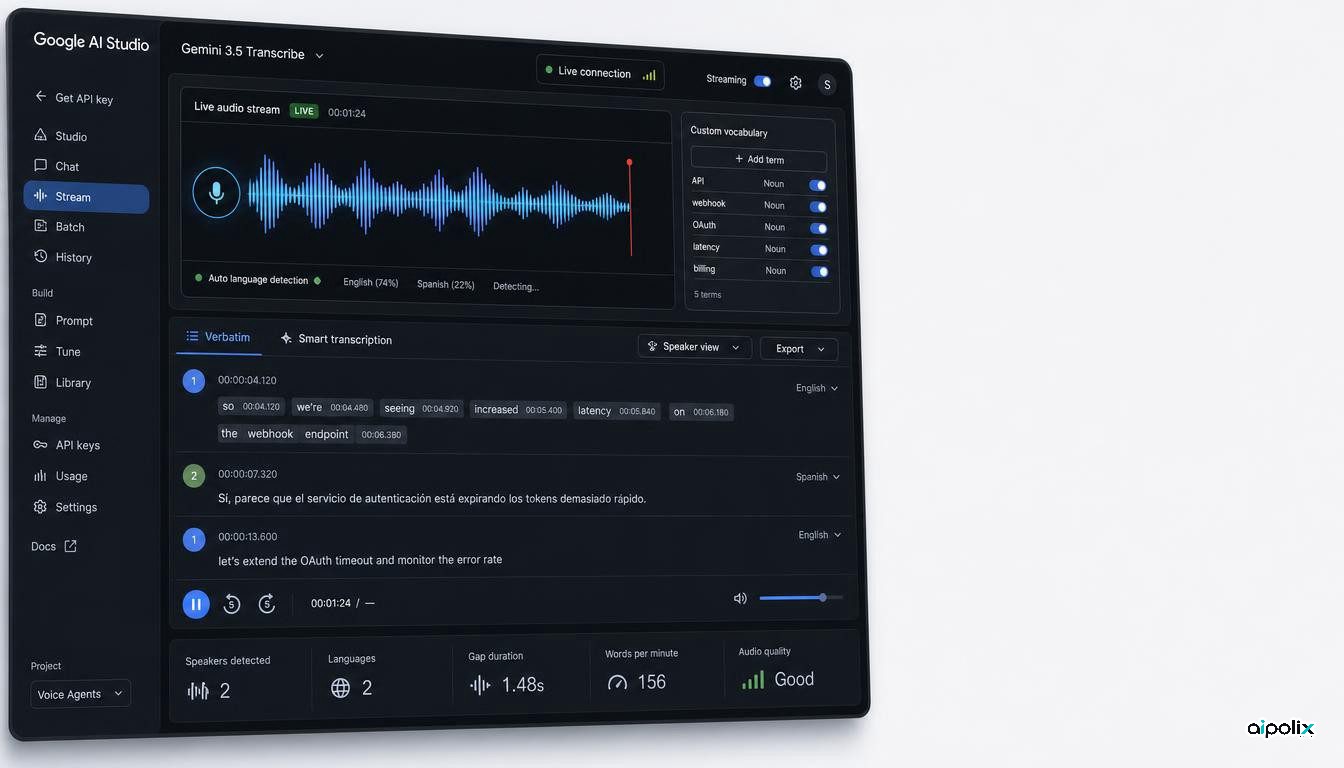
Google has released Gemini 3.5 Transcribe, a speech-to-text model built specifically for live and file-based transcription rather than general audio reasoning. The model is available to developers through the Gemini API, with separate endpoints for ordinary audio files and low-latency streaming. The practical change is that Google is packaging capabilities that usually require several speech-processing components into one model surface: automatic language detection, code-switching, speaker diarization, word-level timestamps, custom vocabulary biasing, and a “smart” mode that can turn disfluent speech into cleaned, formatted text.
That combination matters for teams building voice agents, meeting systems, call analytics, accessibility tools, media workflows, and any application where speech is not just an input modality but a production data stream. The release does not establish that Gemini 3.5 Transcribe is universally more accurate than competing speech systems, and Google’s performance claims remain vendor-reported. But the documented API behavior materially changes what developers can build without assembling a separate transcription, diarization, normalization, and formatting pipeline.
One model now covers both files and live streams
Google exposes two model identifiers. gemini-3.5-transcribe handles uploaded audio files, while gemini-3.5-transcribe-live is designed for streaming transcription over the Gemini Live API. The file-processing endpoint accepts audio of up to one hour per request, although enabling diarization or word-level timestamps reduces the supported duration to 30 minutes. The live endpoint supports sessions of up to 10 minutes.
The distinction is useful because batch and real-time transcription have different engineering constraints. File transcription can afford more complete post-processing and can provide speaker labels and per-word timestamps. Live transcription prioritizes incremental low-latency output. Google’s documentation says the live endpoint supports automatic language detection, custom vocabulary, and smart transcription, but not speaker diarization or word-level timestamps.
For developers, this means the same model family can now span an uploaded interview, a live customer-support conversation, or a voice interface without forcing every application to use the same feature set. It also makes the limitations explicit at API level rather than hiding them behind a single “audio” capability.
Multilingual speech and domain vocabulary move closer to the core API
Gemini 3.5 Transcribe supports automatic detection across more than 85 languages and can switch languages within a session. That is a meaningful workflow change for products that serve multilingual users, because developers do not have to select a single language before transcription starts.
The model also supports custom vocabulary biasing with up to 1,000 terms. Google recommends smaller lists for best results, but the capability is important for domains where names, acronyms, product codes, medical terms, legal terminology, or internal jargon regularly cause transcription errors. Instead of correcting those terms after the fact, applications can provide vocabulary hints as part of the request.
Google documents speaker diarization for uploaded audio with support for up to eight speakers, while attribution for three or more speakers is experimental. Word-level timestamps are also available for file transcription, although Google warns that enabling them can reduce overall transcription accuracy. These constraints are important because they show that the model is not a single all-features-on configuration. Teams still need to choose which metadata is worth the trade-off for a particular workflow.
Smart transcription changes the output from raw speech to usable text
The most opinionated feature is “smart transcription.” In verbatim mode, the model preserves filler words, false starts, repetitions, and the spoken form of the conversation. Smart mode instead removes disfluencies, resolves inline self-corrections, applies punctuation and capitalization, and can format spoken lists, dates, currencies, and numbers into more readable text.
That is useful, but it also changes the semantic contract. A raw transcript is evidence of what was said. A smart transcript is an interpreted representation of what the model believes the speaker intended to say. For meeting summaries, dictation, note-taking, and voice-driven interfaces, that may be exactly what users want. For legal discovery, compliance recording, journalism, regulated call archives, or any workflow where wording itself matters, applications may need to preserve the verbatim transcript separately.
Google makes another important limitation explicit: smart mode cannot be combined with diarization or word-level timestamps. That creates an architectural choice between polished text and richer provenance metadata. A production system may therefore need two passes when it needs both readable output and auditable alignment to the original audio.
The release is already tied into Google’s developer and product stack
Google says the model already powers voice features such as Rambler on Android and transcription in the Gemini app on macOS. Developers can access it through Google AI Studio and the Gemini API. The company is also positioning the model for voice agents, live captioning, and post-call analytics.
The integration surface matters more than the consumer examples. The live model can be used over WebSockets, which makes it relevant to real-time communications stacks and agent interfaces that need a continuous stream of text while the user is speaking. Google’s developer documentation also references partner platforms including Agora, LiveKit, Pipecat, Vercel, and other real-time media tooling.
Ars Technica independently reported the launch and highlighted the same shift from ordinary speech recognition toward cleaned, structured text. It also noted Google’s claim that the new system reduces latency and error rates relative to Chirp 3. Those performance numbers should be treated as Google’s benchmark claims until independently reproduced, but the shipped API surface does not depend on accepting the benchmark comparison.
What engineering teams should evaluate before switching
The first question is not whether Gemini 3.5 Transcribe wins a benchmark. It is whether its integrated feature set removes complexity from a real application. Teams that currently maintain separate speech recognition, diarization, vocabulary adaptation, formatting, and cleanup stages may be able to collapse parts of that pipeline. Teams that already have highly tuned domain-specific ASR may gain less.
Evaluation should include code-switching, accents, noisy environments, proper nouns, domain vocabulary, overlapping speakers, long sessions, and the failure behavior of smart transcription when meaning is ambiguous. For regulated or auditable workflows, developers should compare verbatim and smart outputs and decide which one is the authoritative record.
Latency also needs to be tested end to end. A low-latency model does not guarantee a low-latency application if microphone capture, network transport, WebSocket handling, buffering, downstream agent calls, or UI rendering dominate the experience. The same is true for cost: model pricing matters, but the economic comparison should include any components the integrated API replaces.
The larger significance of Gemini 3.5 Transcribe is therefore architectural. Google is turning transcription from a narrow speech-recognition primitive into a richer model API that can supply both text and workflow-ready structure. For voice-agent and audio-product teams, that creates a simpler starting point, while also making new choices about provenance, interpretation, and feature trade-offs part of the application design.