
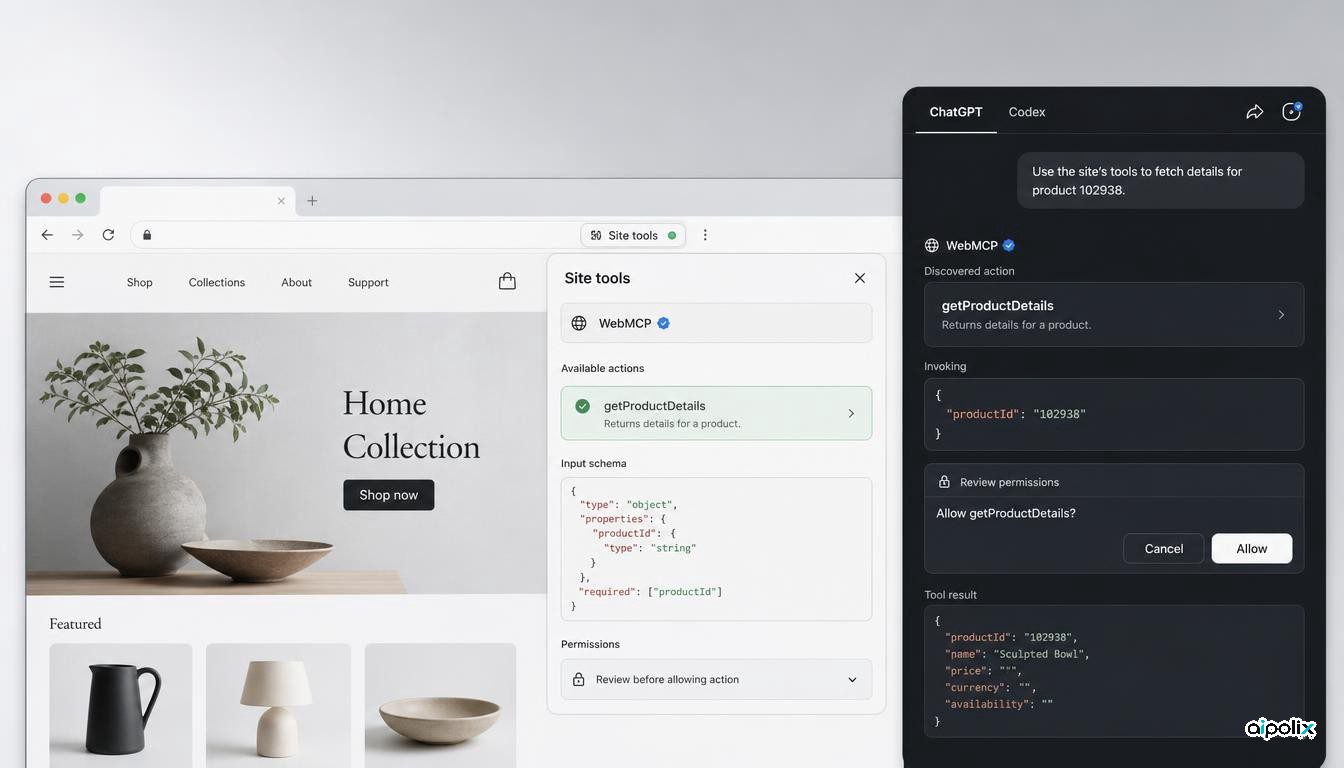
OpenAI has added Site tools to the built-in browser in the ChatGPT desktop app, giving ChatGPT and Codex a structured way to use functions exposed by websites instead of relying only on visual browsing, clicks and typed input. The feature is based on WebMCP, a proposed browser standard for declaring tools that an agent can discover and invoke on the page. For developers, the important change is that an agent can now operate against a website’s explicit tool surface while remaining inside the user’s live, signed-in browser session.
According to OpenAI’s Site tools documentation, a compatible page can expose actions that ChatGPT discovers automatically when they match the user’s request. The user can inspect which tools are available, see whether they read or modify information, and review recently used tools. OpenAI says the feature is available only when the account, selected model and current page support it, and it can be disabled in the desktop browser’s permissions settings.
From browser automation to declared tools
Most browser agents today must infer how to operate a website from the interface. They inspect page content, identify buttons or form fields, decide what each control probably means and then simulate the user’s interactions. That can work, but it is brittle. Small layout changes, ambiguous labels, dynamic components and hidden state can cause an agent to choose the wrong control or lose track of the workflow.
WebMCP changes the integration boundary. A website can describe specific capabilities as structured tools with parameters and behavior that the agent can understand directly. Chrome’s WebMCP documentation describes the approach as a progressive enhancement for agentic task completion: the human-facing interface remains, while structured tool declarations give browser agents a clearer contract for taking action.
In practical terms, this means a travel site could expose a search or itinerary action, a collaborative editor could expose document operations, or a commerce site could expose catalog and cart functions. The agent no longer has to treat every task as a sequence of inferred clicks. The website itself defines the supported action surface.
ChatGPT and Codex now have a product path for WebMCP
The protocol is not new by itself. Google Chrome has been developing WebMCP experimentally, and Cloudflare and other infrastructure providers have already been testing ways to expose WebMCP tools. What changed this week is the OpenAI product integration: Site tools make those declarations directly usable by ChatGPT and Codex in the desktop app’s built-in browser.
OpenAI’s WebMCP Challenge also shows the company actively encouraging developers to build agent-ready applications around the standard. The challenge states that WebMCP lets websites expose structured tools that agents can use directly, and notes that developers can test compatible applications in ChatGPT’s in-app browser as well as experimental Chrome environments.
Independent Japanese developer publication gihyo.jp reported that the August 25 ChatGPT and Codex update added WebMCP-based Site tools to the built-in browser, allowing Work and Codex to detect and use functions exposed by compatible pages. That corroborates that this is a shipped product integration rather than only a standards proposal or developer preview.
The security boundary moves closer to the website
Structured tools can improve reliability, but they do not remove agent-security problems. In some respects they make the control boundary more explicit. A tool runs in the context of a user who may already be authenticated to the site, so developers need to think carefully about authorization, confirmation, scope and the difference between read and write operations.
OpenAI’s documentation says users can inspect tool permissions and may see website-access prompts before ChatGPT continues. It also notes that tools are available only while the relevant webpage is open and do not automatically carry across sites. Those constraints are important because WebMCP is not a general authorization layer. The site still owns the underlying user identity and the permissions attached to that session.
For application teams, this suggests a design rule: exposing an operation to an agent should be treated more like publishing an API method than adding an accessible label to a button. Tool descriptions, parameter validation, permission checks, confirmation requirements and auditability all become part of the product’s agent interface.
WebMCP does not replace conventional MCP
The similar names can be misleading. WebMCP is designed for agents operating in the browser against the page the user is viewing. Conventional Model Context Protocol integrations usually connect an agent to remote tools, services or data sources outside the page lifecycle. They can coexist.
That distinction matters for architecture. A developer may use MCP for durable back-end access to a service while using WebMCP to expose context-sensitive actions tied to a live authenticated webpage. The browser session can provide user state and immediate UI context, while the structured tool declaration reduces the need for visual guesswork.
For teams building agentic products, this creates another interoperability layer to evaluate. The upside is a more explicit contract between websites and browser agents. The downside is another surface that has to be versioned, tested, secured and monitored alongside the human UI and any existing APIs.
What developers should test now
The feature is still tied to an experimental standard and availability depends on the user’s account, model and website support. That means teams should not assume WebMCP is a universal production interface yet. The right near-term approach is controlled experimentation.
Developers should test whether tool schemas remain stable as the underlying UI changes, how agents behave when multiple tools appear applicable, which actions need explicit confirmation, how errors are surfaced, and whether authorization checks are identical to those used by human-facing operations. They should also test prompt-injection and untrusted-content scenarios because a structured tool interface does not make the surrounding page trustworthy by default.
The larger significance is that browser agents are gaining a first-class integration path that sits between fragile UI automation and a separate back-end API integration. With Site tools, OpenAI has made that path directly usable by ChatGPT and Codex. If the standard matures, web teams may increasingly design two interfaces at once: one for people and one structured action surface for agents operating on behalf of those same people.