
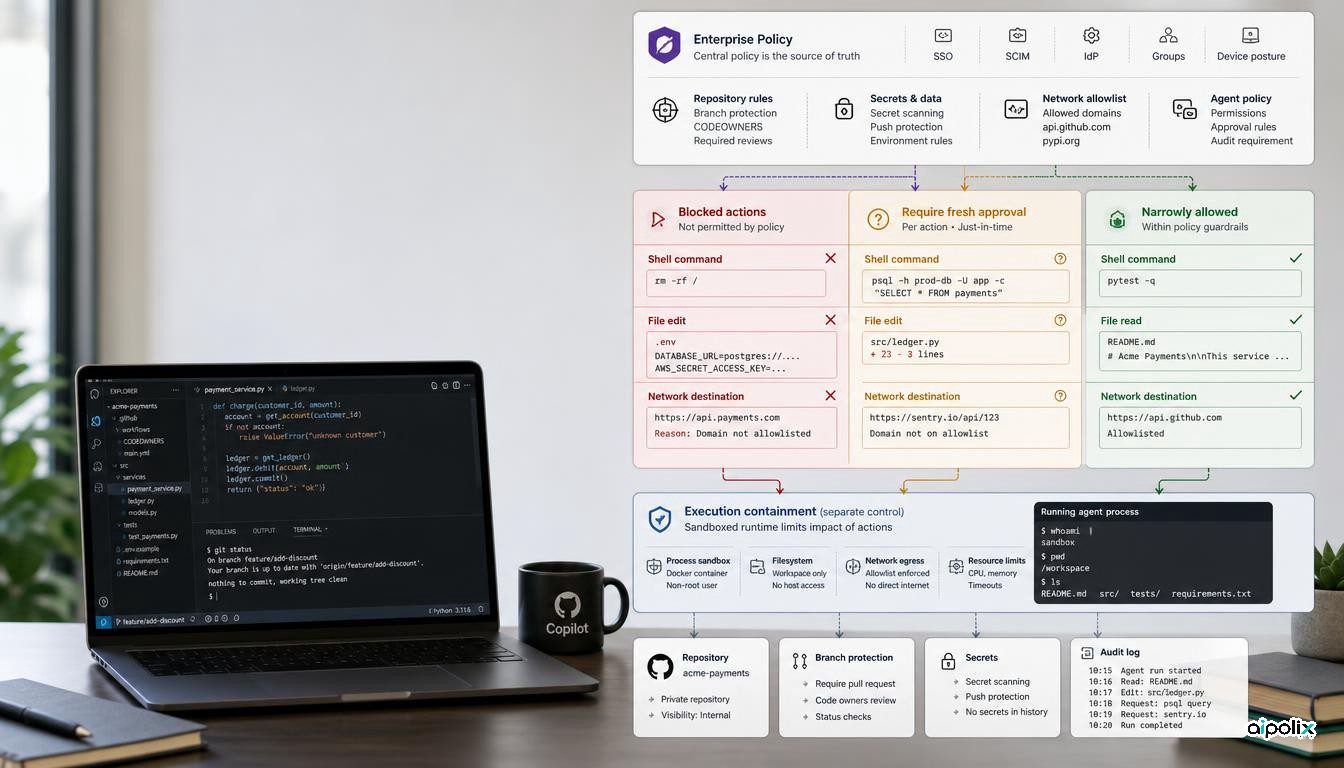
GitHub has made enterprise-managed permissions for Copilot agent operations generally available across the GitHub Copilot app, Copilot CLI, and Visual Studio Code sessions that use Agent Host. Administrators on Copilot Business and Enterprise can now define which supported operations are blocked, which must obtain fresh human approval, and which may run without a prompt.
The practical change is larger than another settings option. GitHub says managed restrictions cannot be weakened by user or workspace settings, auto-approval, or approvals saved from earlier actions. That moves an important authorization decision out of the developer's local session and into an enterprise policy layer.
The new policy can govern commands, files, and network access
GitHub's managed settings documentation defines three permission classes: deny, ask, and allow. Rules can match shell commands, file reads, file edits, and network domains. GitHub documents a strict precedence order in which deny wins over ask, and ask wins over allow.
A managed ask rule is also stronger than an ordinary remembered approval. The documentation says it requires a fresh one-time approval when the operation is requested, and that bypass mode, auto-approval settings, hooks, or previously persisted grants cannot satisfy that requirement. If the same protected action is requested again, the user is prompted again.
The result is a policy mechanism that can distinguish between routine and consequential actions. An enterprise can allow a predictable test command, require approval before a push or sensitive edit, and block access to a protected path or network destination.
This closes a local override gap, not every execution risk
GitHub had already added an enterprise setting in June that could disable Copilot's bypass or so-called YOLO mode. That was an important binary control: administrators could prevent users from turning on an allow-all path that suppresses permission prompts.
The September change is more granular. Instead of only deciding whether bypass mode is available, administrators can express policy at the operation level and can make those rules authoritative over local configuration.
Aipolix's analysis is that this changes the trust boundary for enterprise coding agents. A local developer preference is no longer the final authority for a managed operation. The centrally distributed policy becomes part of the security model, which means the configuration itself should be treated like production control-plane code: versioned, reviewed, tested, and changed through an accountable process.
That does not make the agent sandboxed by definition. GitHub's own documentation separates managed permissions from its sandbox controls. The sandbox has different settings for filesystem paths, outbound and local network access, credentials, local MCP servers, and whether execution should fail closed when a sandbox cannot be enforced. Permission policy decides whether a supported operation may be attempted; containment determines what the resulting process can actually reach.
The strongest rule wins across managed sources
The documentation also describes how multiple managed settings sources combine. A deny rule from any managed source blocks the matching operation. When several sources define allowlists, the effective allowlist is their intersection rather than their union. GitHub also says an unmatched supported operation defaults to requiring approval when an applicable managed source defines permission rules or an allowlist.
Those details matter for large organizations. A team-specific policy can specialize an enterprise baseline where the enterprise explicitly makes a setting overridable, but a permissive local configuration cannot silently cancel a centrally enforced deny.
This creates a cleaner hierarchy of authority, but also raises the cost of a bad central rule. An overly broad deny can disrupt many developers; an overly broad allow can normalize a risky operation across a team. Managed permission files therefore deserve the same change discipline as branch protection, deployment policy, or identity configuration.
Approval prompts are now a governance primitive
For agentic coding, the meaningful question is not simply whether a model can call a shell or edit a file. It is who decides when that action is allowed, whether that decision persists, and whether a user can route around it.
GitHub's new managed ask behavior makes approval ephemeral for protected actions. That is useful for high-consequence operations such as pushing code or changing sensitive files, because a previous approval does not become a reusable capability by accident.
Organizations should still avoid making every action interactive. If too many operations are placed behind prompts, users may approve mechanically. The better design is to reserve ask for actions where context matters, use deny for actions that should never occur through the agent, and use allow narrowly for repeatable low-risk work.
A practical rollout needs both authorization and containment
The release gives enterprises a more enforceable permission layer, but it should not be confused with a complete agent security boundary. A robust rollout combines managed permissions with sandbox policy, repository and branch controls, secrets handling, network restrictions, and auditability around changes to the managed settings themselves.
The useful test is whether a developer can change a local setting, invoke auto-approval, reuse an earlier grant, or switch clients and thereby obtain an operation the enterprise intended to protect. GitHub's managed permission design explicitly closes several of those paths for supported operations across its Agent Host surfaces.
That is the material shift: Copilot's enterprise policy is moving from a preference layer toward an authorization layer. The more authority organizations give coding agents, the more important it becomes that this layer is governed independently of the agent and independently of the user's convenience settings.