
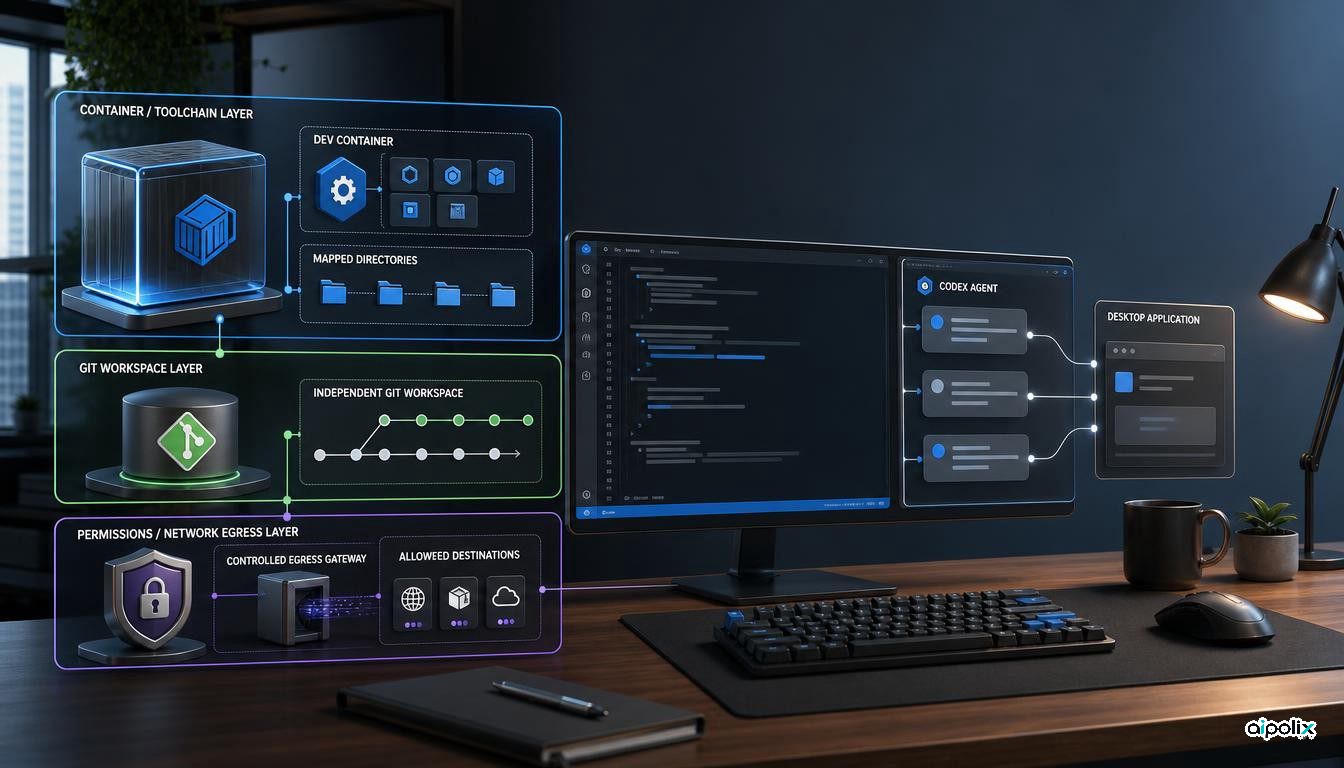
Microsoft released Visual Studio Code 1.138 on September 16 with a change that affects more than the chat interface: developers can start certain agent sessions inside a project's local Dev Container. The release also expands the Codex agent harness so a session can move between the ChatGPT app and VS Code, use the editor's tools, and switch between eligible subscription-backed models without discarding the conversation. Those are separate changes. One concerns the environment where code runs; the other concerns continuity and access to tools. Treating them as the same form of agent portability would hide a consequential distinction for engineering teams.
The new container option is in a gradual rollout, requires Docker and a supported project Dev Container configuration, and applies in the Agents window. It should not be reported as automatically available for every installation. Microsoft documents the feature in the versioned release notes; independent technology coverage confirms the release and its main additions. The model's coding correctness, security effectiveness and productivity in a particular company are not established by that release announcement.
Make the project's toolchain the agent's starting point
With the setting chat.agentHost.devContainer.enabled enabled, an eligible local folder presents a Use Dev Container choice. Starting a session there places the agent in the environment and dependencies described for the project, rather than relying on whatever languages, libraries and command-line tools happen to be installed on the developer's host. Microsoft describes this as an Agents-window feature, with availability rolling out gradually. Docker must be installed and running locally.
This is particularly relevant when teams maintain a devcontainer.json and related image definitions as part of the repository. A generated patch can otherwise appear to pass locally while depending on an accidental library version, a global executable, or a machine-specific configuration. Giving the agent the project environment reduces that particular mismatch. It does not establish that the container perfectly reproduces CI, production, external services or hardware. Teams still need to pin images and dependencies, run the relevant test suite, and compare the configured development environment with their actual delivery pipeline.
Microsoft's harness documentation also states that Dev Container sessions operate directly in the container workspace and do not support the New Worktree option. The environment choice and the code-change isolation choice are therefore not interchangeable. An engineer who needs parallel branches should plan separate workspaces or other repository isolation rather than assume that choosing a container automatically gives every agent an independent Git worktree.
Codex moves between apps, but tools and permissions still matter
The 1.138 agent host can continue the same Codex conversation between ChatGPT and VS Code. A user signed into both eligible services can switch between Copilot-backed and ChatGPT-backed models from the picker without losing that conversation. The release also documents access to VS Code's built-in, extension and MCP tools. If the ChatGPT app is installed and configured for computer use, the Codex harness can reuse that configuration to interact with desktop applications.
That convenience changes the questions engineering leaders should ask. A conversation that crosses application boundaries is not, by itself, evidence that the two environments grant identical authority or execute actions in identical locations. The selected harness, active tools and permission mode remain operational configuration. The first-party harness guide distinguishes execution targets and says that choosing an isolated worktree controls where file changes land; it does not restrict the commands or network access an agent can use.
The release also lets an idle Codex quick chat become a project conversation by attaching a single-root local folder. Users can choose the folder itself or an isolated worktree, and retain the session's title, history, model and permission mode. This is a workflow improvement, not a guarantee that an agent understands a repository simply because an old discussion has been preserved. Relevant tests and repository context should still be supplied or checked.
A container is an environment boundary, not a blanket security certificate
The most important deployment distinction comes from Microsoft's separate trust-and-safety guidance. It says terminal-command sandboxing restricts configured filesystem paths and outbound domains, but does not cover built-in file tools, which instead use VS Code's permission system. The documentation recommends pairing sandboxing with a Dev Container for fuller environment isolation; it does not say a developer may treat every container, mounted volume or extension as trusted without review.
Aipolix's analysis is that a team should verify three controls independently before adopting this workflow: environment reproducibility, code-change isolation, and authority to use files, commands, network endpoints and external tools. The new Dev Container target primarily addresses the first. A worktree, when supported by the chosen target, addresses where edits accumulate. Permissions, command sandbox settings and network filtering address a different question: what an agent is allowed to touch. Mixing these controls in a single checkbox would obscure the failure mode when an agent unexpectedly accesses a secret or sends data to an external service.
An actionable acceptance test is to run the same small repository task once in the container, record image and dependency revisions, inspect which directories are mounted, check the tool and network permissions, and compare the patch and test results against CI. That is a proposed verification procedure derived from Microsoft's release and security documentation, not a claim that Microsoft or Aipolix has tested every user configuration.
Check rollout status before changing team policy
Other parts of 1.138 should not be confused with generally available security controls. Automations are now enabled by default and can be exported or imported; session cleanup remains a preview with automatic marking and deletion disabled by default. Agent Merge and a unified workspace picker have experimental elements. A company should document which settings are enabled for its deployed VS Code channel and whether its managed configuration permits the required actions before assuming that an example works across the organization.
The practical change is real: agent work can be placed closer to the repository's defined toolchain, while Codex conversations can persist across supported applications. The limitation is equally practical. A reproducible development container, an isolated set of edits, a trusted collection of tools and an approved network policy are distinct properties. VS Code 1.138 makes some of them easier to arrange; engineering teams still have to establish and test the rest.